Filter leads by zip code, city, or state. Block what you can't serve.
Google Maps verifies the address. Your logic builder decides who gets through. Out-of-area leads never reach your sales team — and never cost you the CPL.
See zip-code qualification in action.
From dropping the location field into the form to watching out-of-area submissions block at submit. The whole setup, end-to-end.
Three steps. Live in 10 minutes.
Add a location field
Drop a Location field into your form. Connect your Google Maps API key — takes 2 minutes, MakeForms walks you through it. The field now shows real-time address suggestions as the prospect types.
Set your service zip codes
In the logic builder, create a rule: "If zip code is not in [10001, 10002, 10003]…". Add as many zip codes as you serve. You can also filter by city, state, or county — same interface.
Choose your disqualification method
Block the submission entirely (prospect sees a polite message, can't submit) or flag the lead as "outside service area" in a hidden field so your CRM can auto-route it. Either way, your sales team only sees in-area leads.
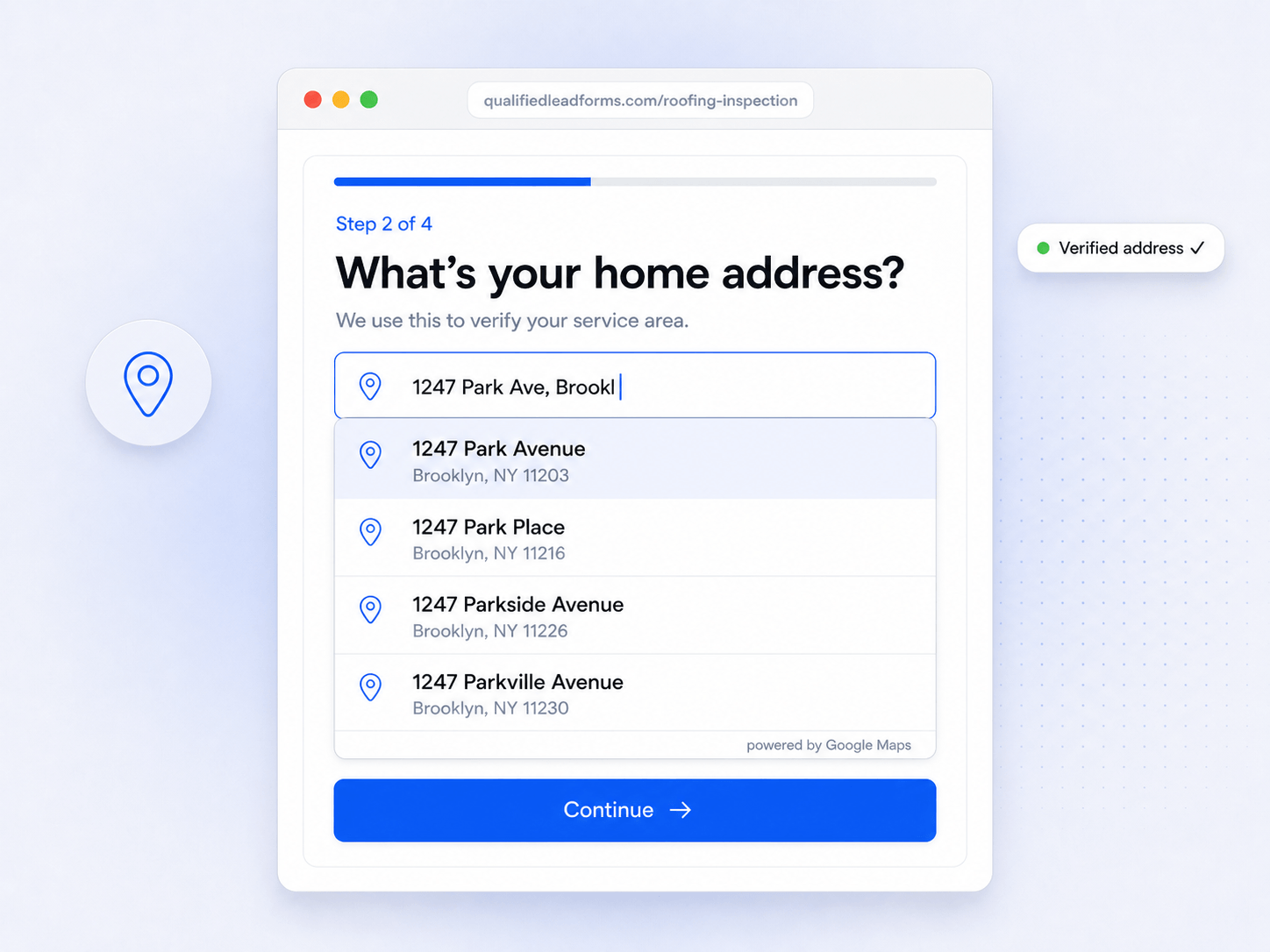
Real address verification. Not a text field you hope they fill correctly.
Standard forms ask for a zip code in a text field. Prospects type whatever they want — their work zip, their childhood zip, a fake zip. MakeForms uses a Google Maps Location field that shows real-time address suggestions as the prospect types. They select their actual address. Google Maps returns the verified zip code, city, and state. Your logic runs on verified data, not self-reported guesses.
Real-time address suggestions.
Google Maps shows matching addresses as the prospect types. They select — not type — their address.
Verified address components.
Zip code, city, and state captured separately and accurately from Google's database.
Covers 100+ countries.
US, Canada, UK, Australia, and beyond. Google Maps address verification works globally.
Set your service area once. MakeForms handles every lead.
The MakeForms logic builder lets you create rules using captured zip code data. "If zip code is not in [list] → show message and hide submit button." Or "If zip code is not in [list] → set hidden field to Outside Service Area." Visual rule builder. No coding. Update your service area at any time without touching your form.
Visual rule builder.
Drag-and-drop conditions. No code, no formulas.
Multi-condition rules.
Combine zip code + state + other qualification criteria in one rule.
Instant updates.
Change your service area zip codes any time. Live immediately on all active forms.
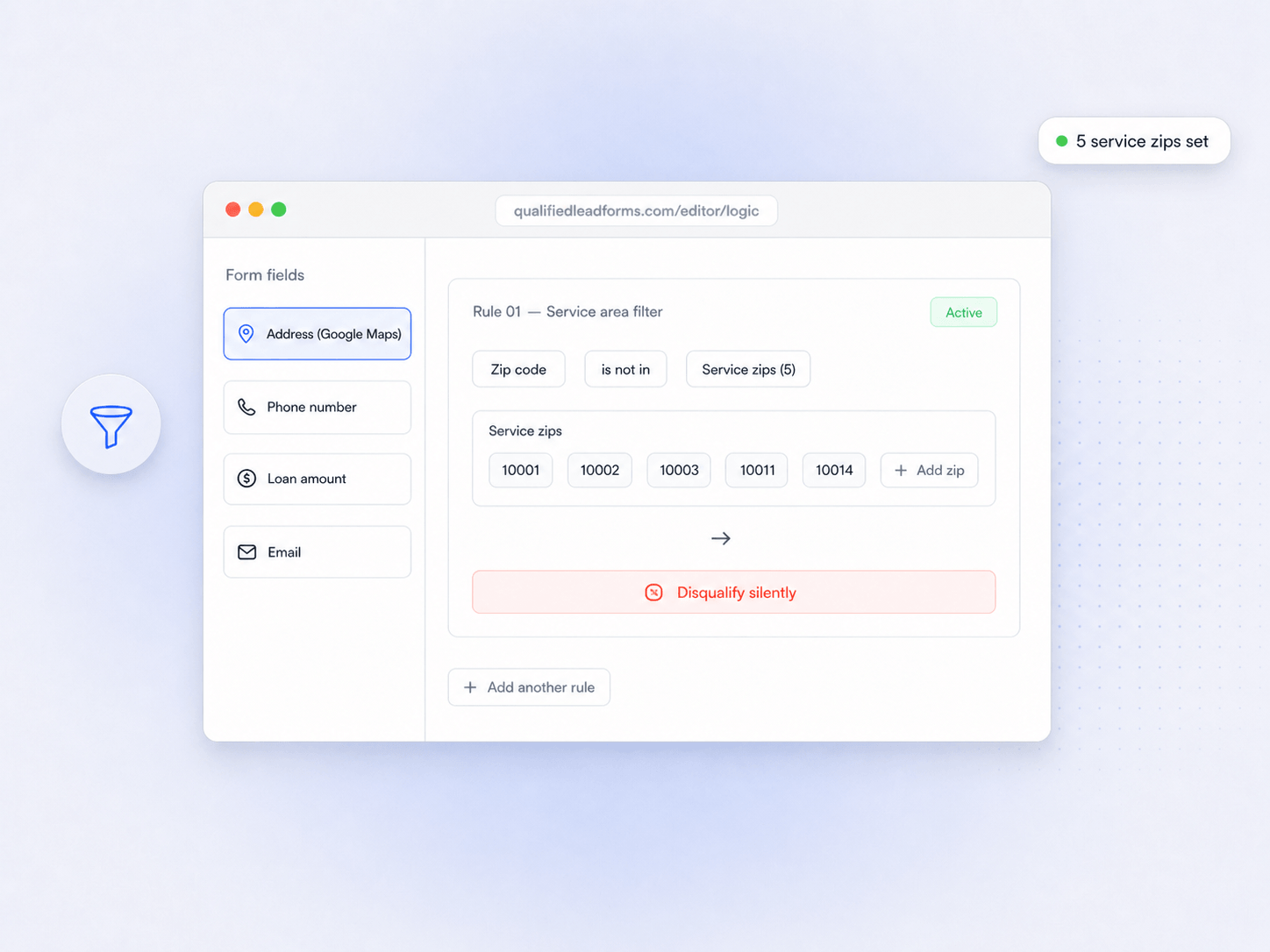
Block or flag. Your call.
Most agencies pick block; the few that plan to expand pick flag.
Stop the submission entirely
When the zip is outside your service area, the submit button disappears and the prospect sees a custom message ("We don't serve your area yet — but check back."). No data is captured. Your sales team only sees in-area leads.
Capture and mark as out-of-area
The prospect can still submit the form. A hidden field is automatically set to "Outside Service Area." Your CRM receives the lead but routes it to a separate pipeline — or an automated "we'll reach out when we expand" email.
Built for teams who serve a real geography.
I recently got a demo and my mind was blown. It's a "Mercedes" of forms. Got all the bells and whistles.

I needed a PIPEDA compliant form maker that could handle single forms for multiple clinic locations. I had a couple of development requests in order for it to meet our needs. The development was quick, and exactly what we asked for.
MakeForms has been instrumental in building out forms to utilize within my business to collect feedback, screen leads, and more. I love that the forms can be built with logic, can be branded, and built with workflow automations.
Every service-area business benefits.
If your business has a geographic limit on who it can serve, zip code qualification eliminates your biggest source of wasted lead spend.
Roofing contractors
38% of roofing form leads are renters who can't authorize work. Zip code filtering adds a second layer — even homeowners 50 miles outside your service area never reach your sales team.
Solar agencies
Solar companies often have state-level licensing or utility-zone restrictions. Filter by zip code, city, or state to ensure every lead is legally serviceable before your closers dial.
Home services (HVAC, plumbing, electrical)
Your trucks cover specific zip codes. Set those zip codes in MakeForms and every lead that comes through is within a driveable distance. No more discovering a dead-arrival lead after dispatch.
Real estate agents
You work specific neighborhoods. Stop getting buyer inquiries from across the country. Filter by neighborhood, city, or county — MakeForms captures all of it from Google Maps.
Delivery and logistics
Only deliver within certain regions? This ensures you only capture orders you can fulfill. Prospects outside your delivery zone see a clear message — not a confirmation email that creates an expectation you can't meet.
Healthcare practices
Dental offices, clinics, and specialist practices serve specific communities. Filter appointment requests by zip code to make sure every booking inquiry is from someone who can realistically attend.
Common questions
How does MakeForms know the zip code?
Do I need a developer to set this up?
Can I filter by city or state instead of zip code?
What happens to the disqualified lead?
How many zip codes can I add?
Does this work on embedded forms?
Stop paying for leads you can't serve.
Book a 15-minute demo. We'll build a zip code qualification form for your service area live — Google Maps address field, service zip codes, block or flag logic. Live in 10 minutes.